

Driving a reliable older vehicle or a base-model car comes with many perks, but missing out on modern driver-assist safety technology is not one of them. In the United States, federal safety regulations mandated standard backup cameras on all new passenger vehicles produced after May 2018. If your vehicle predates this requirement or simply lacked a dash display screen from the factory, backing into tight spaces or maneuvering past unseen obstacles can feel stressful.
Fortunately, lacking an OEM dashboard touchscreen does not mean you are forced to drive without rear visibility or proximity alerts. The aftermarket car audio and electronics industry offers several engineered solutions that integrate seamlessly into virtually any vehicle.
This guide explores every practical option available for adding backup cameras and parking sensors to vehicles without a factory screen, comparing display styles, sensor types, installation complexity, and real-world performance.
| Core Display & Sensor Option | Practical Impact | Best Suited For |
|---|---|---|
| Rearview Mirror Displays | Replaces factory mirror with an integrated monitor that illuminates automatically in reverse. | Drivers who want a clean, factory-like look without cluttering the dash. |
| Standalone Dash Displays | Dedicated 4.3″ to 7″ monitor mounted on the dash or windshield. | Commercial vans, trucks, or drivers prioritizing screen size over stealth. |
| Touchscreen Radio Upgrade | Replaces factory head unit with an Apple CarPlay / Android Auto touchscreen receiver. | Full tech overhaul adding navigation, media streaming, and camera feed in one hub. |
| Audio-Only Ultrasonic Sensors | Multi-frequency beeping alerts that speed up as obstacles get closer—no screen required. | Maximum safety enhancement with minimal cabin modification or visual distraction. |
1. Options for Displaying a Backup Camera Feed
When your car lacks a center dashboard display, the first question is where to view the video feed. Aftermarket manufacturers have developed three primary display methods:
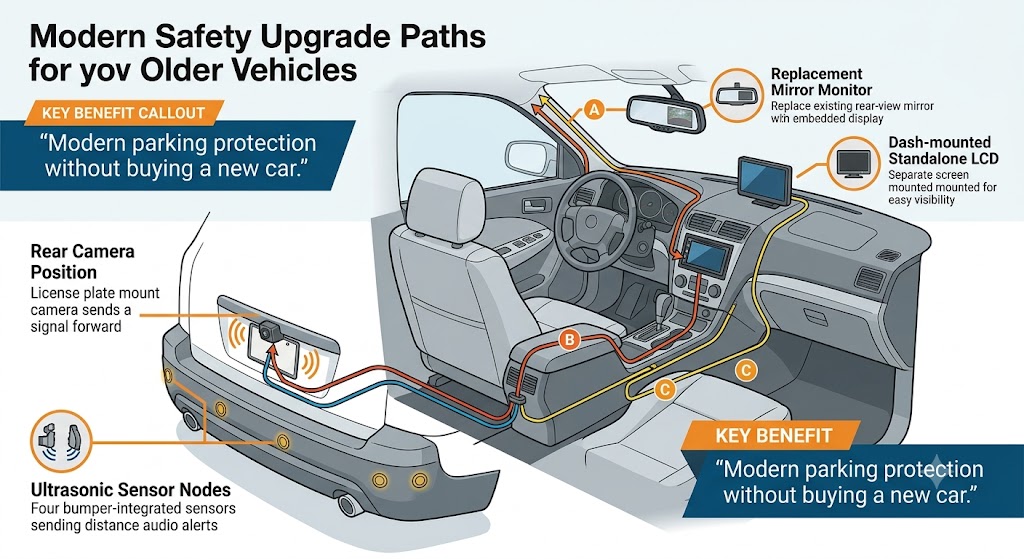
Replacement Rearview Mirror Monitors
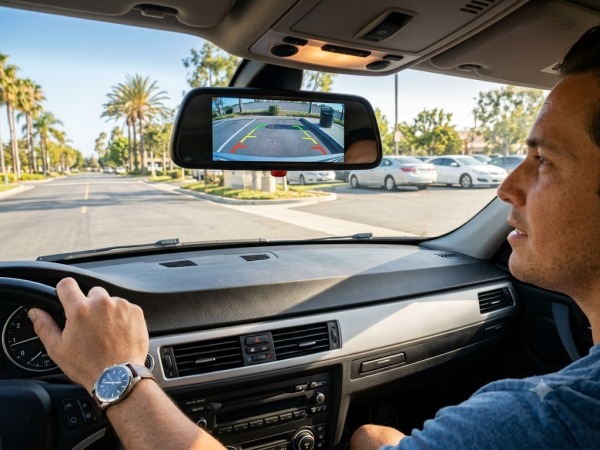
One of the cleanest solutions available replaces your vehicle’s standard rearview mirror with an upgraded unit featuring a hidden LCD screen behind reflective glass.
- How it works: Under normal driving conditions, the glass behaves exactly like a standard reflective mirror. When you shift into reverse, the integrated screen powers on instantly, showing the camera feed behind you.
- Advantages: Preserves the original aesthetic of your vehicle interior, keeps the dash completely clear of cables, and places the display right where you naturally look when reversing.
- Considerations: Requires running wiring up through the A-pillar and headliner to power the mirror and feed video from the trunk or license plate.
Standalone Dashboard or Windshield Monitors
Standalone monitors consist of small dedicated screens (ranging from 4.3 inches up to 7 inches or larger) mounted via suction cup or adhesive to your dashboard or windshield.
- How it works: The screen receives power via hardwiring or a 12V accessory socket and receives video from a wired or wireless rear camera when the reverse gear triggers.
- Advantages: Flexible placement, highly budget-friendly, and easy to transfer between vehicles.
- Considerations: Adds visual clutter to the dashboard and may leave exposed wiring if not professionally hidden behind dash panels.
Double-DIN Touchscreen Head Unit Upgrade
For car owners looking for a comprehensive technology upgrade, replacing the factory radio with an aftermarket touchscreen receiver (such as Pioneer, Kenwood, Alpine, or Sony) provides an OEM-grade experience.
- How it works: The new touchscreen radio replaces the factory stereo unit in the center dash and includes dedicated video inputs for rear (and front) cameras.
- Advantages: Unlocks modern smartphone integration (Apple CarPlay and Android Auto), hands-free Bluetooth audio, superior sound amplification, and a large display for your backup camera.
- Considerations: Higher initial cost and requires dash kit adapters and wiring harnesses specific to your vehicle make and model.
2. Choosing the Right Camera Style
Once you choose a display method, selecting the correct camera style ensures optimal coverage and durability.
Camera Mounting Options:
├── License Plate Frame Mount (Easiest install, centered view)
├── Angled Lip Mount (Subtle, mounted near trunk handle)
└── Flush Bumper Mount (OEM style, integrated look)
- License Plate Frame Mounts: The camera is integrated directly into a slim license plate bracket. It installs using existing screw holes and centers the view automatically.
- Lip / Keyhole Mounts: Compact, cylindrical cameras designed to tuck discreetly under the hatch or trunk lip above the license plate.
- Wireless vs. Wired Cameras: While wireless cameras eliminate running a video cable from trunk to dash, they can occasionally suffer from signal lag or local RF interference. High-grade wired connections remain the gold standard for zero latency, clear video transmission, and long-term reliability.
3. Adding Parking Sensors Without a Screen
Parking sensors (ultrasonic proximity sensors) operate independently of cameras. They use ultrasonic sound waves to measure distance to low-lying objects, walls, or curb hazards that may lie outside a camera’s line of sight.
How Audio-Only Parking Sensors Work
Audio-only systems install small transducer sensors flush into the rear bumper cover.
- Slow Beeping (3 to 5 feet): Alerts you that an object is detected.
- Fast Beeping (1.5 to 3 feet): Warns that you are approaching the obstacle rapidly.
- Solid Continuous Tone (under 1 foot): Indicates an immediate stop is necessary.
Professional automotive technicians color-match sensor heads to your vehicle’s factory paint code, ensuring the sensors appear identical to factory-installed options.
Decision Matrix: Finding Your Ideal Driver-Assist Setup
Selecting the right system depends on budget, dash real estate, and your tech preferences.
| Feature / Criteria | Rearview Mirror Display | Standalone Dash Monitor | Touchscreen Radio Upgrade | Audio-Only Parking Sensors |
|---|---|---|---|---|
| Cabin Aesthetics | Highly Discrete | Utility / Functional | Modern / Premium | Fully Hidden (Exterior Bumpers Only) |
| Visual Aid Type | Video Feed | Video Feed | Video Feed | None (Audible Beeps Only) |
| Additional Features | Dashcam recording options | Portable / Easy transfer | CarPlay / Android Auto / Bluetooth | Works in heavy fog, glare, or darkness |
| Installation Scope | Moderate Wiring | Simple to Moderate | Moderate to High | Bumper Drilling & Power Tap |
| Optimal For | OEM look enthusiasts | Commercial / Fleet drivers | Complete interior upgrade | Drivers wanting distance feedback without screens |
Frequently Asked Questions
Can I install a backup camera myself if my car has no screen?
Yes, basic DIY wireless kits with cigarette-lighter power plugs exist. However, hardwired systems—which offer superior image stability, zero signal lag, and hidden wiring—typically require splicing into your vehicle’s reverse light power circuit and running cables beneath interior trim panels. Professional installation guarantees clean wiring, correct camera tilt, and proper electrical sealing.
Are wireless backup cameras reliable for daily driving?
Wireless backup cameras have improved significantly, but they are still susceptible to occasional radio frequency interference, delay (latency), or moisture intrusion in transmitter modules. For maximum safety and instantaneous video feed when engaging reverse gear, hardwired video connections remain the industry recommendation.
Will aftermarket parking sensors damage my bumper?
When installed by qualified technicians, parking sensors will not damage your vehicle. Specialized hole punches or drill bits create clean, factory-spec circular cutouts in the bumper fascia. Sensors are then mounted from behind with watertight grommets and paint-matched to preserve factory finish.
Which is better: a backup camera or parking sensors?
Neither replaces the other; they complement each other. A backup camera provides clear visual verification of high objects and children behind your car, while ultrasonic parking sensors warn you about unseen low curb hazards, blind corners, or severe weather conditions where camera lenses might get covered in dirt or rainwater. Combining both yields maximum reversing safety.
Upgrading Your Vehicle Safely
Upgrading your vehicle with modern backup camera technology or parking sensors restores driving confidence without requiring a costly vehicle trade-in. Whether you select a sleek replacement mirror display, an audio-based ultrasonic sensor kit, or a full touchscreen media overhaul, choosing quality components and precise installation ensures your system functions reliably for years to come.
For drivers in Southern California seeking expert advice and flawless integration, consulting a certified mobile electronics specialist is the best next step.
Need expert advice on upgrading your vehicle? Sorena Car Audio in Irvine, CA specializes in custom driver-assist retrofits, camera integrations, and premium car audio upgrades tailored to your exact vehicle model.
Reviewed by Tech Lead & Master Installer at Sorena Car Audio. This content reflects professional automotive electronics installation standards, current industry practices, and a strict commitment to vehicle electrical system safety.
We offer all car audio services
List of Services:
- DashCam
- Ambient Lighting
- Starlight
- Windows Tinting
- Armoring & Ballistic Protection
- Apple CarPlay
- Dash Upgrade
- Android Auto
- Paint Protection Film (PPF)
- Sound Deadening – Sound Proofing
- Front and Rear Parking Sensors
- Blind Spot Radars
- Car Ceramic Coating
- HD Backup Camera
- Mirror Monitor
- Subwoofer Integration
- Classic Car Audio
- Wheel Well Sound Deadening
- Marine Audio System
- Marin Audio
- Flipdown Monitor
- Bluetooth Integration
- Rear Entertainment System
- Steerig Wheel Upgrade
- Car Wrapping
- Interior Suede Alcantara Wrap
- Alcantara Suede Headliner
- ECU Tuning
- Center Console Safe Installation
Leave A Comment